Whisk AI-functies: Ontgrendel uw creatieve potentieel
Whisk AI helpt u betere prompts te creëren door intelligente analyse- en verbeteringstechnieken.
Promptverbetering
Transformeer basisideeën in gedetailleerde, beschrijvende prompts die afbeeldingen van hogere kwaliteit genereren.
Enhanced: "Een sticker met een witte rand op een witte achtergrond, en de stijl is eenvoudig en cartoonachtig met dikke zwarte contouren. De kleuren zijn helder en verzadigd, en de algehele uitstraling is speels. Het lijkt op een sticker die je op een waterfles of broodtrommel zou vinden. Zorg ervoor dat alles (personages, locaties/scènes, elementen) BINNEN de sticker wordt opgenomen. De achtergrond is effen wit (verwijder alle andere achtergrondinformatie)."
Stijlanalyse
Identificeert uw beoogde artistieke stijl en verbetert deze met relevante stilistische beschrijvingen.
Enhanced: "Een foto van het onderwerp als een chibi knuffel gemaakt van zachte stof, gericht op de camera op een witte achtergrond. De knuffel is gemaakt van zachte, knuffelbare stof. Ze hebben zachte knoopogen en een vriendelijke uitdrukking. Ze zouden een geweldige vriend zijn om mee te knuffelen! Ze zijn volledig in beeld, gecentreerd en niet bijgesneden, zittend op een tafel. De achtergrond is effen wit (verwijder alle andere achtergrondinformatie). De belichting is gelijkmatig en zacht. Dit is een perfecte foto voor een productvermelding."
Detailverfijning
Voegt cruciale details toe aan uw prompt die de beeldkwaliteit en nauwkeurigheid drastisch verbeteren.
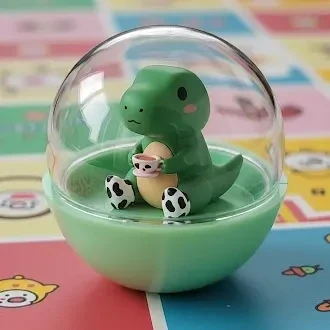
Enhanced: "Een close-up van een kleine, doorschijnende plastic bolvormige container met daarin een figuur wordt getoond tegen een witte achtergrond. De container is in tweeën gelaagd, met een helder bovendeel en een doorschijnend gekleurd ondergedeelte. Er zit een kawaii figuurtje in de container. De belichting is gelijkmatig en helder, waardoor schaduwen worden geminimaliseerd. De algehele stijl is schoon, eenvoudig en productgericht, met een licht glanzende afwerking van het plastic."


How Whisk AI Enhances Your Prompts
Natural Language Understanding
Whisk AI uses Google's Gemini model to understand your creative intent from simple, everyday language. You don't need to learn complex prompt syntax or special keywords. Just describe what you want to see, and Whisk interprets your meaning identifying the subject, desired mood, artistic style, and compositional elements automatically.
For example, saying "a cozy cabin in winter" triggers Whisk to add details about snow coverage, warm interior lighting, pine trees, and atmospheric fog that dramatically improve the generated image quality.
Style-Aware Generation
Each style in Whisk AI Sticker, Plushie, Capsule Toy, Enamel Pin, and more comes with specialized prompt templates developed by Google Labs. These templates encode expert knowledge about what makes each style look authentic, from the thick outlines of sticker art to the soft fabric textures of plushie renders.
The style system goes beyond simple filters. Whisk restructures your entire prompt to match the visual language of each style, adjusting lighting, materials, perspective, and background elements for optimal results.
Powered by Imagen 3
Behind the scenes, Whisk leverages Google DeepMind's Imagen 3, one of the most advanced text-to-image models available. Imagen 3 excels at photorealistic rendering, consistent character design, and accurate text rendering within images capabilities that set it apart from earlier generation models.
Combined with Whisk's prompt enhancement layer, this means you get professional-grade outputs from simple descriptions, without needing to understand the technical details of how the AI generates images.
Who Uses Whisk AI?
Content Creators
YouTubers, bloggers, and social media managers use Whisk to generate thumbnails, illustrations, and visual content without hiring a designer. The style presets make it easy to maintain a consistent visual brand across platforms.
Small Businesses
From product mockups to marketing materials, small business owners use Whisk to create professional visuals on a budget. The tool's ability to blend subject, scene, and style images means you can quickly prototype ideas before committing to professional design work.
Educators & Students
Teachers create visual aids for lessons, while students use Whisk for project illustrations and creative assignments. The low barrier to entry makes it an ideal tool for introducing AI concepts in educational settings.